
 0
 0
Key Findings at a Glance
- → 50-200ms added latency per redirect hop Each redirect in a chain typically adds 50-200 milliseconds of latency, which can affect page speed and user experience. [yam.ie]
- → John Mueller confirms 301 redirects pass full PageRank Google's John Mueller has stated that a single clean 301 redirect passes full ranking signal, though chains of multiple redirects may lose some signal. [yam.ie]
- → Two extra redirect hops can add half a second on mobile networks Each hop requires a full round trip before a page begins loading, which compounds on mobile connections. [tkwebhosts.com]
- → Keep redirects in place for at least a year after a site move Google treats a permanent redirect as a signal that the target should be canonical, and recommends maintaining redirects for a minimum of one year post-migration. [redirect.pizza]
- → Redirect chain checker traces hops across more than 20 countries Integr8's redirect chain checker simulates residential IPs from over 20 countries and multiple device types (Windows, Mac, iOS, Android) to reveal geo- and device-specific redirect behavior. [integr8.co]
- → HTTP mode follows 301, 302, 303, 307, and 308 Location redirects Browser-Use's redirect checker traces five distinct HTTP redirect status codes plus JavaScript and meta-refresh navigations in browser mode. [browser-use.com]
Redirect chains quietly drain ranking signal and page speed unless someone checks them on a regular schedule rather than stumbling across them by accident. By the end, a site owner should know how many hops is too many and how long old redirects need to stay live after a migration. The ten-hop ceiling cited by tkwebhosts.com matters because it marks the point where Google simply stops following a chain rather than penalizing it gradually.
1How Many Redirect Hops Should A Site Allow?
One or two hops is fine, such as an http-to-https switch. Google may stop following a chain entirely at 10 hops, according to tkwebhosts.com. Redirect.pizza recommends keeping redirects live for at least one year after any site move.
A single clean hop between variants is normal; three or more starts burning crawl budget for no real benefit. Redirect.pizza's one-year maintenance window exists because Google reads a permanent redirect as a signal about which page should be canonical, and pulling that signal too soon can undo months of consolidation work. Once the hop count and maintenance window are settled, the next question becomes how much each of those hops actually costs in load time.
2Redirect Latency Adds Up Fast On Mobile
Each redirect hop adds 50 to 200 milliseconds of latency, per yam.ie. On mobile networks, two extra hops can add half a second before a page even starts loading, according to tkwebhosts.com, since every hop needs its own round trip.
Half a second sounds small until it stacks against mobile connections that are already slower than desktop broadband. A chain with three or four hops, each costing up to 200 milliseconds by yam.ie's figures, can push total delay well past a second before any content renders. That delay compounds with other mobile bottlenecks the same way household triggers compound for anxious dogs, a pattern covered in understanding why dogs fear thunderstorms and solutions, where small stressors pile into a bigger reaction. Page speed problems traced to redirects are fixable with a single rewrite of the chain, unlike many other performance issues. Canonical URL handling is one of the most common causes of these extra hops in the first place.
3Why Do Sites End Up With Four Competing URLs?
Every domain has four possible URL variants: http, https, www, and non-www, according to tkwebhosts.com. Only one should return a 200 status. The other three must 301 redirect to it, or search engines may split ranking signal across versions.
Four variants is the standard count, and automated checks flag any site where more than one of them loads without redirecting. This split matters directly for rankings, since John Mueller has confirmed a single clean 301 passes full ranking signal, per yam.ie, but that signal only consolidates properly when three of the four variants point cleanly to the fourth. Fixing this is usually a server configuration change, not a content rewrite. Once canonical variants are sorted, the next layer of detail is which specific status codes a checking tool needs to follow to catch every type of redirect.
4Which Status Codes Do Redirect Checkers Actually Follow?
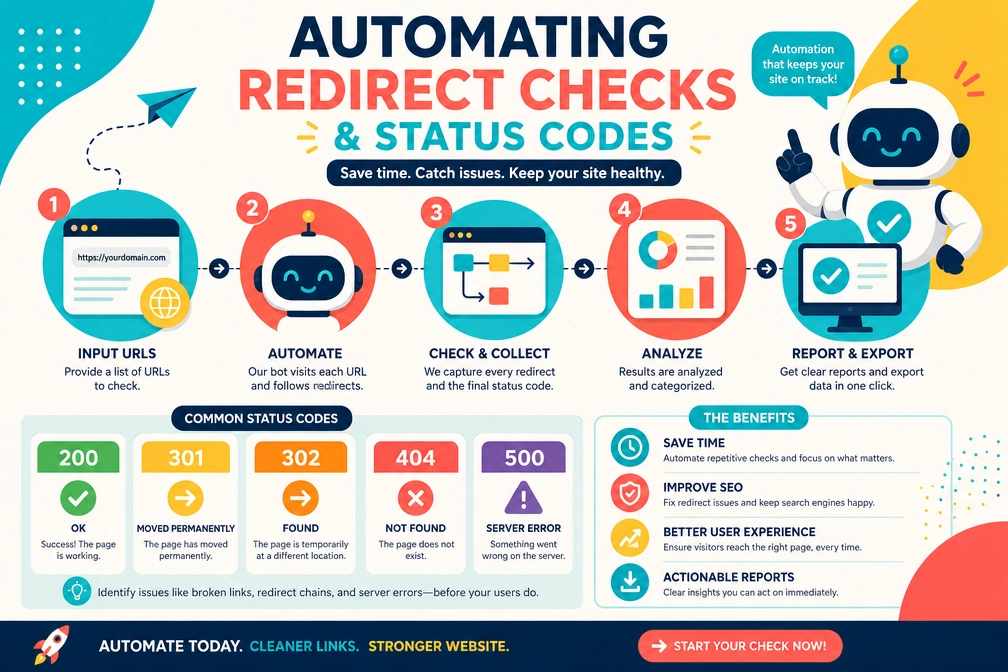
Browser Use's redirect checker follows 301, 302, 303, 307, and 308 status codes, per browser-use.com. Redirect.pizza confirms these five are the full set of 3xx codes used specifically for redirects, distinct from other 3xx responses like 304.
Five codes cover the entire set of redirect behavior, and missing even one in an automated scan leaves blind spots. A 307 or 308, for instance, preserves the original request method, which matters for forms and APIs in a way a basic 301 scan would never reveal. Browser-use.com's tool also catches JavaScript and meta-refresh navigations in browser mode, which standard header checks skip entirely since those redirects never appear in the HTTP response at all. That gap between header-only checks and full browser-mode checks is exactly what separates basic tools from the more capable ones built for scale.
5Integr8 And AWS Show Two Different Scales Of Checking
Integr8's redirect chain checker simulates residential IPs from more than 20 countries and four device types, per integr8.co. AWS documents a three-service architecture for running redirect checks at scale, according to aws.amazon.com.
Integr8's geographic spread exposes a problem single-location testing cannot: a redirect that works fine from one country can loop or break entirely for a visitor in another. Testing across Windows, Mac, iOS, and Android adds a second dimension to that same check. AWS's three-service setup targets a different scale entirely. Where Integr8 is built for diagnosing why one URL fails for one segment of users, AWS's architecture is built for running the same check across thousands of URLs on a schedule, which matters once a site moves from occasional audits to ongoing monitoring. That shift toward continuous checking is part of a broader change in how SEO tooling has developed since redirect testing first became a formal web standard.
6Redirect Checking Has A Longer History Than Most SEO Tools
The W3C documented a redirect checking technique, SVR1, as part of its accessibility guidelines back in 2008, according to w3.org. Automated redirect checking predates most modern SEO tooling by well over a decade.
The 2008 W3C reference shows redirect checking started as an accessibility concern, not an SEO one, long before tools like Integr8 or Browser Use existed. That origin explains why some redirect-checking logic still overlaps with accessibility auditing standards today. What has changed since 2008 is scale and automation, not the underlying problem.

What The Ten-Hop Limit And The Four URL Variants Have In Common
The ten-hop ceiling documented by tkwebhosts.com and the four competing URL variants on every domain point to the same underlying issue: redirect problems multiply quietly until a scan catches them. Each hop costs 50 to 200 milliseconds by yam.ie's figures, and on mobile that can mean half a second lost before a page even starts loading.
None of this requires guesswork. Keep chains to one or two hops, confirm only one of the four URL variants returns a 200 status, and maintain redirects for at least a year after any migration, per redirect.pizza's guidance.
Methodology
How these numbers were gathered, and how much they can be trusted:
Data draws from vendor tool pages and SEO guides rather than peer-reviewed research, so some figures like latency ranges and hop thresholds reflect general industry observation rather than controlled studies. Google's own documentation on exact redirect chain limits is not public, so the ten-hop figure is a third-party estimate.
- Sources consulted: 10
- Sources cited: 5
- Data range: 2026 data collected from active redirect-checking tool pages and SEO guides
- Freshness: 5 current-year, 0 last-year, 0 older
- Update schedule: Quarterly
Frequently Asked Questions
What is an automated redirect check?
An automated redirect check uses software to crawl a list of URLs and record each hop, status code, and final destination without manual clicking. Tools like Browser Use trace status codes including 301, 302, 303, 307, and 308, saving teams from testing links by hand across large sites.
How many redirect hops are too many?
One or two hops is normal and tolerable, such as an http-to-https switch. Three or more hops starts to waste crawl budget, and Google may stop following a chain entirely once it reaches ten hops, so longer chains risk losing ranking signal and search visibility.
Do redirects slow down a website?
Yes. Each redirect hop typically adds 50 to 200 milliseconds of latency, and on mobile networks, two extra hops can add half a second to load time. Since every hop needs a full round trip before the page even starts loading, long chains hurt speed and user experience.
Does a 301 redirect pass full ranking value?
Google's John Mueller has said a single clean 301 redirect passes full ranking signal to the new page. However, chains built from several redirects strung together may lose some of that signal, which is why checking for clean, single-hop redirects matters for SEO.
How long should old redirects stay active after a site migration?
Google treats a permanent redirect as a signal that the new page should be seen as the main one, so most guidance recommends keeping redirects active for at least one year after a site move. Removing them too early can confuse crawlers and send visitors to broken pages.
Can redirect checks reveal problems across different countries or devices?
Yes. Integr8's redirect chain checker simulates residential connections from more than 20 countries and tests four device types, including Windows, Mac, iOS, and Android. This setup helps spot geo-specific or device-specific redirect errors that a single test from one location would never catch.
How do I know which URL variant should be the canonical one?
A site typically has four possible URL variants: http, https, www, and non-www. Only one of these should return a 200 status; the other three should 301 redirect to it. Automated checks quickly flag sites where more than one variant resolves without redirecting.
What redirect types can automated tools detect beyond standard HTTP codes?
Besides the five common HTTP redirect codes (301, 302, 303, 307, 308), tools such as Browser Use and Integr8 can also detect meta-refresh tags and JavaScript-based redirects in browser mode. This matters because these non-HTTP redirects can hide broken paths that basic header checks miss.
Sources & References
- tkwebhosts.com. "Free Redirect Checker | Trace Redirect Chains & Status Codes" — tkwebhosts.com. Accessed 2026-11-13.
- yam.ie. "Bulk URL Checker - Check HTTP Status, Redirects & Response Time" — yam.ie. Accessed 2026-11-13.
- redirect.pizza. "URL Redirects Explained: 301, 302, HTTPS & SSL Setup" — redirect.pizza. Accessed 2026-11-13.
- integr8.co. "Free Redirect Chain Checker - Trace Hops by Country & Device" — integr8.co. Accessed 2026-11-13.
- browser-use.com. "Free Redirect and HTTP Headers Checker - Browser Use" — browser-use.com. Accessed 2026-11-13.
Last updated: November 13, 2026